
🍷 XTeam
Senior Frontend Engineer - React Native 📅 Sep 2022 - Jul 2023
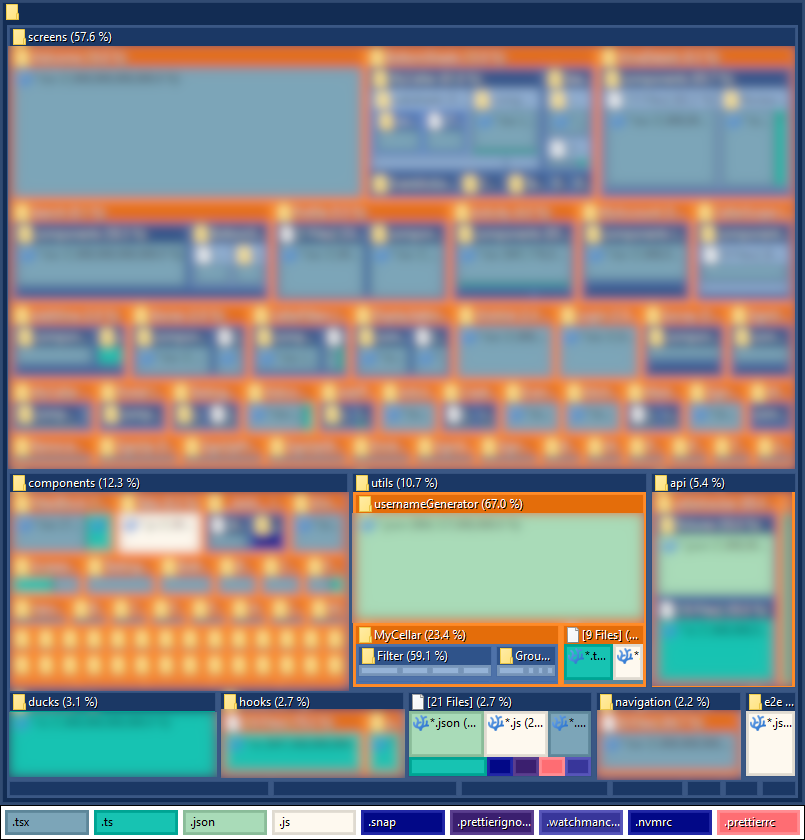
🌲 Project Treemap
🧱 Tech Stack
- Analytics: Mixpanel React Native
- Animations: Moti, Motify Interactions, React Native Reanimated
- Assets Files: Expo Asset, React Native Dynamic App Icon
- Auth: Expo Apple Authentication, Expo Auth Session, Expo Local Authentication
- Build Configuration: Copy Files From To, Expo Build Properties, Expo Dev Client, Patch Package, Postinstall Postinstall
- Camera: Expo Camera
- Charts: React Native Chart Kit, Victory Native
- Clipboard: React Native Clipboard
- Config Plugins: Config Plugins Detox, Config Plugins Dynamic App Icon
- Crypto: Expo Crypto
- Data: Apisauce, Axios Auth Refresh, Deepmerge, QS
- Dates: Date Fns
- Deployment: Expo Updates
- Device: Expo Application, Expo Constants, Expo Device, Expo Linear Gradient, Expo Linking, Expo Location, Expo Mail Composer, Expo Notifications, Expo Random, Expo Splash Screen, Expo Status Bar, Expo System UI, Expo Web Browser
- Feature Flags: Flagged
- Fonts Icons: Expo Fonts, Expo Google Fonts Arbutus Slab, Expo Google Fonts Inter, Expo Vector Icons, React Native Vector Icons
- Forms Validation: Formik, Hookform Resolvers, React Hook Form, React Native Formik, Yup
- Images: Expo Image, Expo Image Manipulator, Expo Image Picker
- Internationalization: Expo Localization, FormatJS Intl DateTimeFormat, FormatJS Intl GetCanonicalLocales, FormatJS Intl Locale, FormatJS Intl NumberFormat, FormatJS Intl PluralRules, Intl, React Intl
- JavaScript Framework: Expo, React, React Native
- Markup Parsing: BBob Plugin Helper, BBob Preset, BBob React, React Native Render HTML
- Media: Expo AV, Expo Barcode Scanner, Expo Media Library
- Monitoring: Reactotron React Native, Reactotron Redux, Redux Logger
- Navigation: React Navigation Bottom Sheet, React Navigation Bottom Tabs, React Navigation Drawer, React Navigation Elements, React Navigation Material Top Tabs, React Navigation Native, React Navigation Native Stack, React Navigation Stack
- Performance: Shopify FlashList
- Search: Diacritics, Fuse JS
- State Management: React Redux, Redux Persist, Redux Toolkit
- Storage: React Native Async Storage
- Styling: Gorhom Bottom Sheet, React Native Calendars, React Native Keyboard Aware Scroll View, React Native Masked View, React Native Multi Slider, React Native Pager View, React Native Paper, React Native Paper Dropdown, React Native Safe Area Context, React Native Screens, React Native Segmented Control, React Native Tab View
- Testing: Detox, Detox Recorder, Jest, Jest Expo, React Native Testing Library, React Test Renderer, Testing Library Jest DOM, Testing Library Jest Native, Testing Library React, Testing Library React Native, TS Jest
- TypeScript Linting: ESLint, ESLint Config Prettier, ESLint Plugin FormatJS, ESLint Plugin Prettier, TypeScript
- Web: React DOM, React Native Web
🌟 STAR Cases
STAR Case - Performance Bottleneck
Situation
Before my involvement, the app was built only with a dozen hard-coded entries. This limited dataset masked scalability issues in the fetching and rendering logic. After I integrated the backend, the app received thousands of real bottle registries, and the existing implementation could not handle this scale, causing the app to freeze during feching, filtering, grouping, and searching.
Task
Re-architect how the app handled large-scale data to:
- Build a modular and maintainable architecture for data and UI.
- Enhance user experience with smooth navigation and search.
- Ensure accurate results across all features.
- Support thousands of records without freezing.
Actions
First I needed to guarantee the data was loaded quickly and accurately. For that I reviewed how the app was fetching and storing information and found deeply nested loops, duplicated logic and recalculations on every action. To reorganize the data fetching and storage flow, I created consistent patterns for how records were requested, saved and displayed. I also introduced a preloading logic that ensured data was available before the UI rendered. This eliminated unnecessary reload cycles and gave users a faster and smoother experience from cold boot.
After that I addressed the UI data rendering code. Many filtering and sorting elements were duplicated and inconsistent so I refactored them into reusable components which made the interface easier to maintain and extend. To improve the experience of browsing large inventories I introduced sectioned lists and infinite scroll which reduced rendering cost and gave users a smooth and responsive navigation.
Below is one of the optimizations I introduced to the selectors.
- export const selectCustomFilters = (...) => {
-   ...
-   return {
-     locations: [
-       ...new Set(
-         cellar
-           .map(i => {
-             if (i.Holdings) {
-               return i.Holdings.map(holding => {
-                 if (holding.Locations) {
-                   return holding?.Locations.map(k => {
-                     return k.Location;
-                   });
-                 } else {
-                   return;
-                 }
-               }).flat();
-             }
-             return;
-           })
-           .flat()
-           .filter(i => typeof i === 'string'),
-       ),
-     ],
-     ...


+ const FilterPendingDataArray = (inCellarWines: InCellarWinePending[]) => {
+   const resultData = {} as FilterObject<PendingFilters>;
+
+   inCellarWines?.forEach?.(wine => {
+     const hasBottles = wine?.Purchases?.some?.(p => !!p?.Quantity);
+     if (!hasBottles) return;
+
+     addNewFilterDataItem(resultData, 'appellation', wine?.Appellation);
+     ...
+
+     wine?.Purchases?.forEach(p => {
+       if (!p?.Quantity) return;
+       addNewFilterDataItem(resultData, 'bottleSize', p?.Size);
+     });
+   });
+
+   const { appellation, bottleSize, country, masterVarietal, region, subRegion, type } = resultData;
+   [appellation, bottleSize, country, masterVarietal, region, subRegion, type].forEach(a => a?.sort?.(sortStringAsc));
+
+   const { vintage } = resultData;
+   [vintage].forEach(a => a?.sort?.(sortNumberAsc));
+
+   return resultData;
+ };
Results
- Better user experience: responsive infinite scrolling and grouped lists improved navigation.
- Fast search and filtering: thousands of entries could be queried without performance loss.
- Higher developer productivity: reusable, modular UI components reduced duplication.
- Scalable architecture: a foundation that supported new features and long-term growth.
- Smooth performance: large datasets became responsive and near-instant to operate on.
STAR Case - Unstructured Backend Responses
Situation
After we managed to consistently recover thousands of entries across the app, the next challenge was the lack of a proper model to organize, sort, and feed data into the UI. The core issue was the same as before: the data model was partially incorrect and hardcoded. In addition, the backend did not provide a reliable way to validate its payloads, and in many cases critical fields were missing.
Task
Create a reliable way to handle the app’s deeply nested and inconsistent backend data in order to:
- Enable users to quickly find and browse bottles with accurate results.
- Ensure the model could scale to thousands of entries without breaking.
- Establish a consistent foundation for filtering and search.
- Resolve issues caused by missing and unreliable fields.
Actions
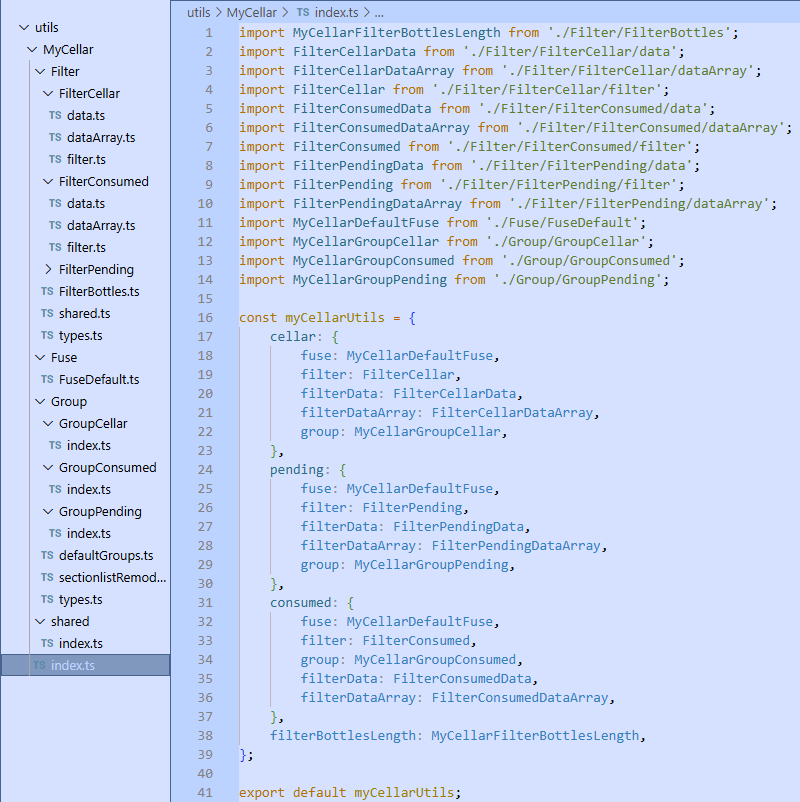
To solve this I restructured the data handling into a graph-structured traversal model where each level of information (bottles, holdings, locations, bins) was treated as a connected node. This approach created a navigable structure where starting from a node like a location you could immediately find the bottles stored there and from those bottles trace back to their vintage or other attributes. This replaced scattered nested loops with a clear and predictable flow, making the model easier to maintain, extend, and scale.
This graph approach gave three major advantages:
- Consistency: the same traversal logic powered cellar, pending, and consumed states, removing duplication and errors.
- Extensibility: adding a new filter meant only extending traversal rules for a node, not rewriting entire loops.
- Traversal clarity: instead of nested loops, each level of the data (wine → holding → location → bin) contributed in an organized way.
Results
- Extensible filters: new filter types were added without breaking existing functionality.
- Faster and accurate search: browsing and filtering across thousands of entries became smooth and responsive.
- Maintainable data model: a graph-inspired approach organized unstructured responses into a predictable system.
- Reliable filtering: users could apply filters consistently even when backend data was incomplete.
STAR Case - Missing Internationalization
Situation
The app serves a global audience of wine collectors who expect multiple language support. While there were some early attempts at internationalization, the application was inconsistent and incomplete. Many components still relied on hardcoded English strings for filters, chips, dropdowns, and error messages. This incomplete approach made the UI feel disjointed and awkward, blocking full localization and limiting the app’s ability to deliver a scalable, accessible international experience.
Task
Establish a consistent internationalization pattern to:
- Create a scalable i18n foundation that developers could apply uniformly across the app.
- Ensure UI elements like filters, chips, and dialogs were fully translation-ready.
- Fix prior inconsistencies and enable a seamless multilingual experience for end users.
- Replace remaining hardcoded strings with localized messages.
Actions
I refactored the application to use a consistent internationalization pattern, replacing static strings with translated messages across components. To simplify adoption, I created hooks to make it easy to pull translations into any new component.
Below is the hook I introduced, which encapsulated the logic for pulling translation messages, formatting them with react-intl, and wiring them into navigation flows. This removed duplication and made internationalization extensible across filters, chips, bottom sheets, and dropdowns:
import {useNavigation, useRoute} from '@react-navigation/native';
import {useIntl} from 'react-intl';
import {useEffect, useRef} from 'react';

const useEventActionSheet = ({messages, title, params, onSelect}) => {
  const route = useRoute();
  const {formatMessage} = useIntl();
  const navigation = useNavigation();
  ...

  useEffect(() => {...}, [route?.params]);

  const openSheet = () => {
    const options = Object.keys(messages).map(key => {
      const message = messages[key];
      return {
        label: formatMessage(message),
        value: message.value,
      };
    });

    navigation.navigate('EventActionSheet', {...});
  };

  return [openSheet];
};

export default useEventActionSheet;
Results
- Broader international reach: multilingual support prepared the app to serve a global user base effectively.
- Consistent user interface: standardized messaging eliminated awkward or disjointed UI patterns.
- Faster development workflows: developers could add new components with built-in i18n support and less duplication.
- Scalable i18n foundation: reusable hooks centralized logic and ensured consistent adoption across the app.
- Translation-ready UI: all hardcoded strings were removed and replaced with localized messages.